Writing Safe UPDATE and DELETE Statements in Production
Prevent catastrophic mistakes by verifying targets and rolling back before committing.
An UPDATE or DELETE statement is destructive by default. That's the whole problem in one sentence. INSERT adds a row and, worst case, you clean it up later. But UPDATE and DELETE act on whatever the WHERE clause tells them to act on, and if there's no WHERE clause, that means every row, instantly, with no undo button built into standard SQL.
A DELETE without a WHERE clause empties the table. An UPDATE without one rewrites every value in a column, for every row, in milliseconds. There's no confirmation dialog. There's no "are you sure?" There's just a cursor, a semicolon, and a table that used to have data in it.
And the damage often isn't caught right away. It's not usually the engineer who notices. It's finance, hours later, running a batch job that comes back empty or wrong. By then the mistake has already been sitting there for a while, quietly compounding.
A few incidents make this less abstract:
GitLab, January 31, 2017: an accidental removal of data from the primary database server cost thousands of projects, comments, and new user accounts. The damage happened over a window from 17:20 to 00:00 UTC. A French real-estate AI startup, June 2025: an engineer working directly on production, without staging or confirmed backups, triggered a delete that cascaded through Row Level Security and wiped three months of processed leads. The company was only saved by Supabase's automatic backups, and still lost a substantial window of data. Replit's AI agent, July 2025: the agent deleted data from a production database. Replit's CEO called it "unacceptable and should never be possible," and the response included changes to prevent the agent from reaching production data unsupervised. An illustrative case from TheCodeForge, 2026: a junior engineer ran DELETE FROM orders with no WHERE clause, believing they were in staging. They were in production. 14,000 customer orders gone in 0.2 seconds. The schema was fine. The table was just empty.
Look at what these incidents have in common: multiple terminal sessions open across different environments, connection strings pointed at the wrong place, cloud consoles that look identical whether you're staring at staging or production. The SQL itself is rarely the interesting failure. The setup around it is.
These aren't stories about careless people. They're stories about systems that let one honest mistake turn into a catastrophe with no checkpoint in between. Which means the fix isn't "be more careful." The fix is building habits and structures that catch the mistake before it becomes catastrophic. That's what the rest of this piece walks through.
Starting with SELECT: the habit that catches most mistakes before they happen
Ask any experienced DBA how they write an UPDATE or DELETE, and you'll get some version of the same answer: they don't start by writing UPDATE or DELETE. They start by writing SELECT, using the exact WHERE clause they intend to use in the mutation.
Why does this work so well? Because SELECT is read-only. It can't hurt anything. And it answers the two questions that actually matter before you touch data:
How many rows is this about to hit? One row, or the whole table? Is the filter even correct? Is the WHERE clause grabbing what you think it's grabbing, or something wider?
That second question matters more than it sounds like it should. Filtering on a name field, for instance, is asking for trouble, since names collide and match fuzzy things you didn't intend. Filtering on a stable key, like a BookingID or a ConfirmationCode, doesn't have that problem. A key means one row, every time.
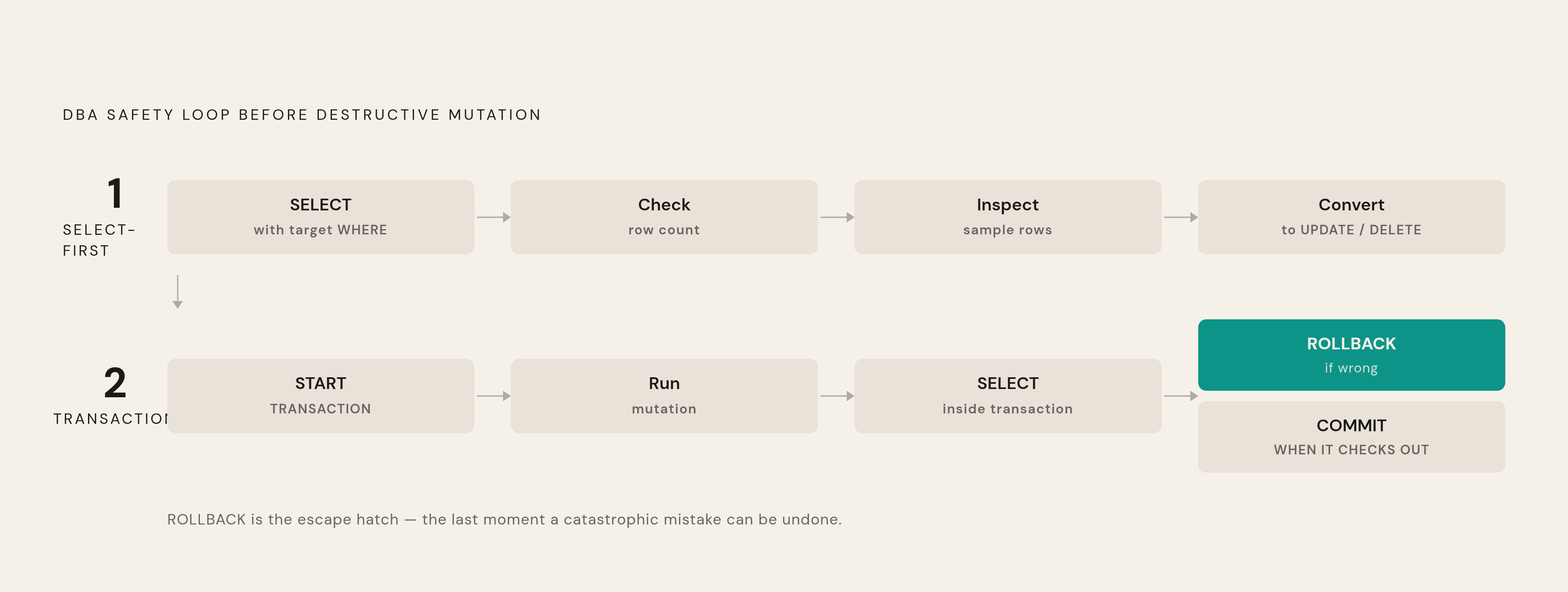
The workflow, in practice, looks like this: write the SELECT, check the row count, eyeball a sample of the actual rows, and only then convert it into an UPDATE or DELETE. Per TheCodeForge, this pattern shows up again and again, both in DBA literature and in the postmortems written after things go wrong.
After the mutation runs, run the SELECT again. Confirm the result matches what was expected. That step isn't optional flourish, it's the other half of the habit. And it's worth writing down what changed and why, ticket number, timestamp, reason, before-and-after evidence, so the change is traceable later if anyone needs to ask what happened.
Think back to the 14,000-order deletion. If that engineer had run SELECT * FROM orders first, the full table returning every row would have made it immediately clear that no filter was in place. SELECT-first would have stopped that mistake cold, before a single row was touched.
But SELECT only catches intent errors, meaning the times you meant to do one thing and the query does something else. It does nothing once the mutation is actually running. For that, you need a second layer.
Wrapping mutations in transactions so mistakes can be reversed
A transaction gives you something SELECT can't: a reversal window. Run the UPDATE or DELETE inside a transaction, look at the result, and if something's off, you roll it back like it never happened. Nothing is final until COMMIT says it's final.
SQL Server's DBA community has a pattern for this that shows up constantly (per sqldbaschool.com):
BEGIN TRY/BEGIN TRAN, then the mutation, thenCOMMIT TRANinside theTRYblock.BEGIN CATCH: checkIF @@TRANCOUNT > 0 ROLLBACK TRAN, thenTHROW.
The error handling is baked into the structure. If something fails, the transaction doesn't quietly commit anyway. It rolls back, on purpose, every time.
Autocommit is on by default in MySQL. That means every DML statement that finishes without error is immediately, permanently committed. There's no transaction wrapper unless you build one. You have to explicitly run SET autocommit = 0 or start with START TRANSACTION before the mutation, or you don't get a reversal window at all.
A MySQL-specific workflow makes this concrete:
- SELECT to verify the target rows.
START TRANSACTION.- Run the UPDATE or DELETE.
- SELECT again, inside the still-open transaction, to inspect the change before it's permanent.
- ROLLBACK if anything looks wrong. COMMIT only once it checks out.
A 2024 study cited by Moldstud reported organizations with strict transaction controls saw a 45% drop in data anomalies, attributed to the International Journal of Information Technology. That number is worth treating as a data point to verify independently rather than gospel, but the direction it points in lines up with everything else here: a reversal window catches what a first pass misses.
Transactions don't replace SELECT-first, they stack on top of it. SELECT-first checks intent before you touch anything. The transaction checks outcome after you've touched it but before it's locked in. Together they form a two-stage loop.
But both of these habits assume the person running the query should have been allowed to run it in the first place. That's a separate question, and it's the next layer.
Database-level guardrails that make unsafe queries structurally harder to run
Habits are only as good as the person practicing them, consistently, every single time, under deadline pressure, at 6 p.m. on a Friday. Database-level guardrails don't rely on that consistency. They make the dangerous query structurally harder to run, whether or not anyone remembered to be careful.
MySQL's SQL_SAFE_UPDATES is the clearest example. Turn it on (SET SQL_SAFE_UPDATES = 1) and MySQL will flatly reject any UPDATE or DELETE that lacks a WHERE clause using a key column. The query errors out before it executes, with a message that says exactly what happened: "You are using safe update mode and you tried to update a table without a WHERE that uses a KEY column."
Checking whether it's active is one line: SHOW VARIABLES LIKE "sql_safe_updates"; or SELECT @@sql_safe_updates;. It's also a checkbox in MySQL Workbench, under Edit → Preferences → SQL Editor → "Safe Updates" (a restart is required after toggling it).
Where should it live? Ben Nadel recommends enabling it in local development, since that's where it catches the most unbounded statements while they're still cheap mistakes. In production, it can get in the way of legitimate work, migrations and analytics jobs that genuinely need to touch every row. One middle path worth considering: leave it on by default in production, and let individuals toggle it off for their own session on the rare occasion they deliberately need an unbounded operation. That way the default is safe, and the exception is a conscious choice, not an accident.
MySQL supports stored routines that fire automatically on INSERT, UPDATE, or DELETE, and can be written to block deletion on specific tables outright. SQL Server offers similar mechanisms for enforcing constraints at the engine level.
None of this replaces SELECT-first or transaction discipline. Guardrails catch what slips through human process. They're a backstop for the habits underneath them.
But guardrails at the query level still leave a bigger question open: who should even be able to reach the database with mutation rights in the first place?
Least-privilege access and just-in-time permissions as a structural control
The Principle of Least Privilege is simple to state: give users and applications only the exact permissions their task requires, nothing more, and pull those permissions back the moment the task is done.
What happens without it? Developers end up with production DELETE access they don't strictly need, which means the approved process (the one with SELECT-first and transactions and review) becomes optional rather than mandatory, because the access to skip it is just sitting there. Shared credentials make it impossible to say who did what. And broad permissions hand out more destructive power than any single role actually calls for.
Both GitLab and Replit's incidents involved direct production access that enabled unrestricted DML operations. The access model wasn't a footnote to those failures, it was part of the failure.
Just-in-time access is the modern answer to this. A common pattern is persistent admin access, meaning someone gets elevated permissions once and keeps them indefinitely, whether or not they're actively using them. JIT access flips that: elevated privileges get granted only when a specific task needs them, and removed automatically once the task is done. The window where a mistake with production credentials is even possible shrinks to the size of the task itself.
Some practical hygiene sits alongside this:
Regular permission audits. Review every admin account. Confirm current employees have only what they need. Pull access for anyone who's left, immediately, not at the next scheduled review. Scoped application credentials. An app's database user should have INSERT/UPDATE/DELETE only on the specific tables it touches, not a blanket grant across the whole database. Read-replica access for analytics. Point BI and reporting queries at a replica, not the primary. That isolates analytics traffic from production writes and removes the ability to mutate data from that path entirely.
MySQL's GRANT statement is the mechanism that makes all of this practical: permissions can be set per user, per scope, global, database, table, or even column. That granularity is what turns least-privilege from a nice principle into something you can actually configure.
Access controls and query guardrails both work on probability, they reduce the odds a bad write ever reaches production. But some bad writes get through anyway. What happens next depends on a different question entirely: can the data be reconstructed?
Backup and recoverability as the floor under every other safety measure
There's a maxim that circulates in database communities for a reason: "Until you personally have seen a successful restore from backup, you do not have backups. You have hopes and prayers that you have backups." A backup nobody has ever restored from is a theory.
The French real-estate startup incident from June 2025 makes this concrete. Every other layer discussed so far was missing in that case, no staging, no confirmed backup process, direct production access. But Supabase's automatic backups were there, and they're the reason the loss was capped at 22 hours of data instead of three months of processed leads. One working layer, out of five possible layers, was the difference between an incident and a disaster.
Backing up before a mass operation should be an active step. A well-established practice lays this out plainly: before a large UPDATE or DELETE, copy the affected table (SELECT * INTO customer_backup FROM customer). After the operation runs, compare the old table against the new one, which doubles as a verification step, not just insurance. If everything checks out, drop the backup table. If something's wrong, swap back and fix the query. Restoring from a table copy isn't a single command, constraints have to be dropped, data restored, constraints recreated. It's a process.
Staging environments do something similar, earlier in the pipeline. A staging environment that mirrors production, with anonymized data standing in for the real thing, catches errors before they ever reach live data. The 14,000-order incident started with a developer who genuinely believed they were in staging. Environment clarity, meaning making it obvious and hard to miss which environment you're in, is itself a safety control. Different terminal prompt colors, explicit environment labels in connection strings, visible indicators in whatever GUI is open on screen. Small things. They work because they're impossible to miss.
Every habit covered so far applies at the moment a query runs. But there's a decision made much earlier, at the schema level, that shapes how much recoverability exists before any of these habits even come into play: whether a deleted row disappears, or just gets marked as gone.
Soft delete vs. hard delete: an architectural decision with safety and compliance implications
A hard delete removes the row. It's gone. Getting it back means backups, logs, or replicas, and nothing simpler than that. It's easy to reason about because there's nothing left to reason about.
A soft delete keeps the row in place and flags it, usually with a field like deleted_at or is_deleted. The application treats flagged rows as invisible, but the data is still sitting there in the table.
The case for soft delete as the safer default in a lot of systems comes down to a few things:
Referential integrity stays intact. Foreign keys don't break. Joins don't suddenly return nulls where a related row used to be. Analytics don't get corrupted. Hard delete a product from the catalog and every past order tied to it now shows up as "Unknown" in a revenue report. Soft delete keeps the historical record coherent. Good fits: support tickets, orders, invoices, audit logs, user profiles, records where the history matters as much as the current state.
But soft delete has a skeptic's case too, and it's worth taking seriously. Brandur Leach, who worked at Heroku and Stripe, has pointed out that across more than ten years at companies using soft deletion, he's not aware of anyone actually using it to undelete a record in real practice. The recoverability benefit gets talked about a lot more than it gets used. A safety feature nobody exercises is, in practice, closer to unused code than to a safety feature.
And soft delete has real, ongoing costs:
- Every SELECT in the codebase needs a
deleted_at IS NULLpredicate, forever. Forget it once, anywhere, and logically deleted data leaks back into view. - Indexes get more complicated. What used to be a plain index now needs to become a partial index scoped to non-deleted rows, and uniqueness constraints need to explicitly exclude deleted records too.
There's also a point where soft delete isn't just inconvenient, it's the wrong architecture entirely:
GDPR's right to erasure. Soft delete hides a record from the app, but it's still sitting there, queryable by admins, present in exports, indexed in search, visible to analytics. For a lot of GDPR erasure requests, that doesn't count as erasure. It counts as hiding. PCI-DSS. A soft-deleted card number is still a stored card number. That's a compliance violation and a security exposure at the same time. Anything short-lived and sensitive by nature. Auth tokens, session data, password reset codes, PII or PHI under a legal right-to-erasure obligation. These need to actually be gone. Storage at scale. High-volume logging tables accumulate forever under soft delete, since nothing ever really leaves. Hard-deleting rows past a retention threshold is often the only way to keep storage costs and query performance predictable.
So the decision splits fairly cleanly:
Soft delete: support tickets, orders, invoices, audit logs, user profiles. Hard delete: auth tokens, session data, password reset codes, anything covered by an erasure obligation, and high-volume logs with a defined retention window.
Neither one is the universally correct answer. The right call depends on what the row represents and what happens legally, operationally, and financially if that row either lingers or disappears.
How the database GUI or tool a team uses reinforces or undermines these habits
A lot of the environment-confusion problem traces back to the interface sitting between the person and the query. Two connections, one to staging and one to production, can look identical on screen: same color scheme, same layout, same font, no visual cue anywhere that says which one is live. That's not a minor UI detail. It's the exact condition that let the 14,000-order deletion happen, a developer who believed, reasonably, based on what was in front of them, that they were somewhere safe.
A GUI or query tool can reinforce the habits covered above, or quietly undermine them, depending on a few things:
Does it show environment identity clearly? Color-coded connections, explicit labels, a banner that says "PRODUCTION" in a color that's hard to miss. If a tool treats every connection the same visually, it's removing a safety signal that costs nothing to keep. Does it support running a SELECT before a mutation without friction? A tool that makes it easy to preview a query's results before committing to a destructive version of it is reinforcing the SELECT-first habit. A tool that treats every statement the same, with no distinction, isn't. Does it expose transaction state? Whether autocommit is on, whether a transaction is currently open, whether there's an uncommitted change sitting there waiting for a decision. Hiding that state makes it easy to think you have a rollback window when you don't. Does it surface row counts before execution, not just after? Seeing "this will affect 14,000 rows" before hitting run is a different experience than finding out after the fact.
None of this is about any particular product being better or worse in the abstract. It's about whether the tool's design treats environment identity, transaction state, and row counts as things worth surfacing, or as details left for the user to track manually, in their head, under time pressure, across multiple open terminal windows. The habits in this piece work. But they work a lot better when the tool in front of a person is quietly reinforcing them instead of making them easy to forget.