Postgres Partial Indexes for Sparse Filtered Queries
Slim down bloated indexes by targeting only the rows your queries actually touch.
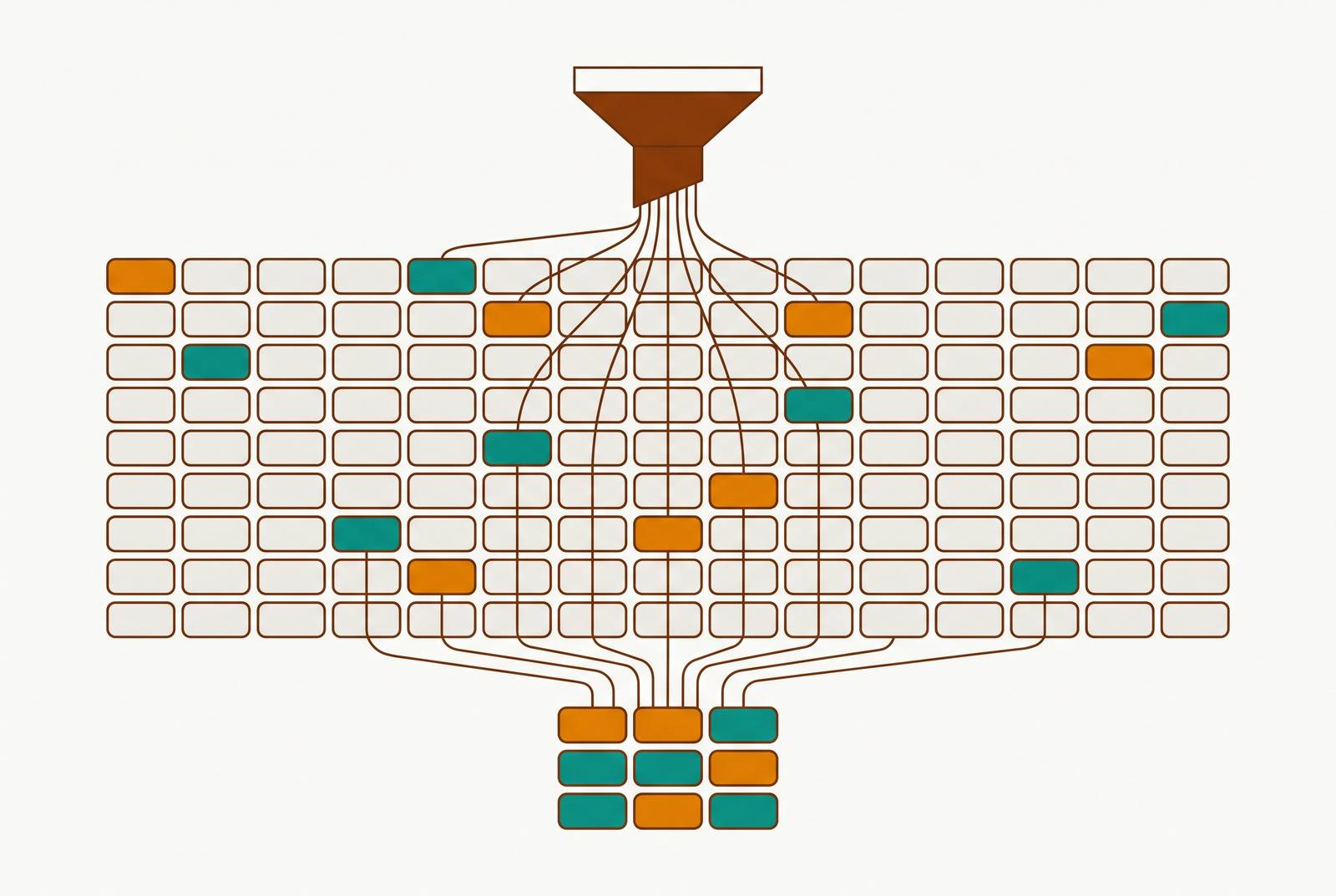
A partial index is an index built on a slice of a table, not the whole thing. You add a WHERE clause to the CREATE INDEX statement, and only the rows that match get stored in the index structure. It sounds small at first glance. It's actually more significant than that.
Quick terminology note: PostgreSQL calls this a "partial index," not a "sparse index." That second term comes from MongoDB and older B-tree textbooks and is absent from the Postgres docs.
The syntax is plain:
CREATE INDEX idx_name ON table (column) WHERE condition;The WHERE clause can be almost anything: an equality check, an IS NULL test, a range, even a regex match on an expression. The index type underneath stays the same — it's still a B-tree, still GiST, still GIN, whatever you'd normally pick. The partial predicate just sits on top and decides which rows get let in. Achieving the same effect is straightforward: WHERE column IS NOT NULL indexes only rows where the column has a value, which is functionally equivalent to what other databases call a sparse index.
Why a full index on a skewed column works against you
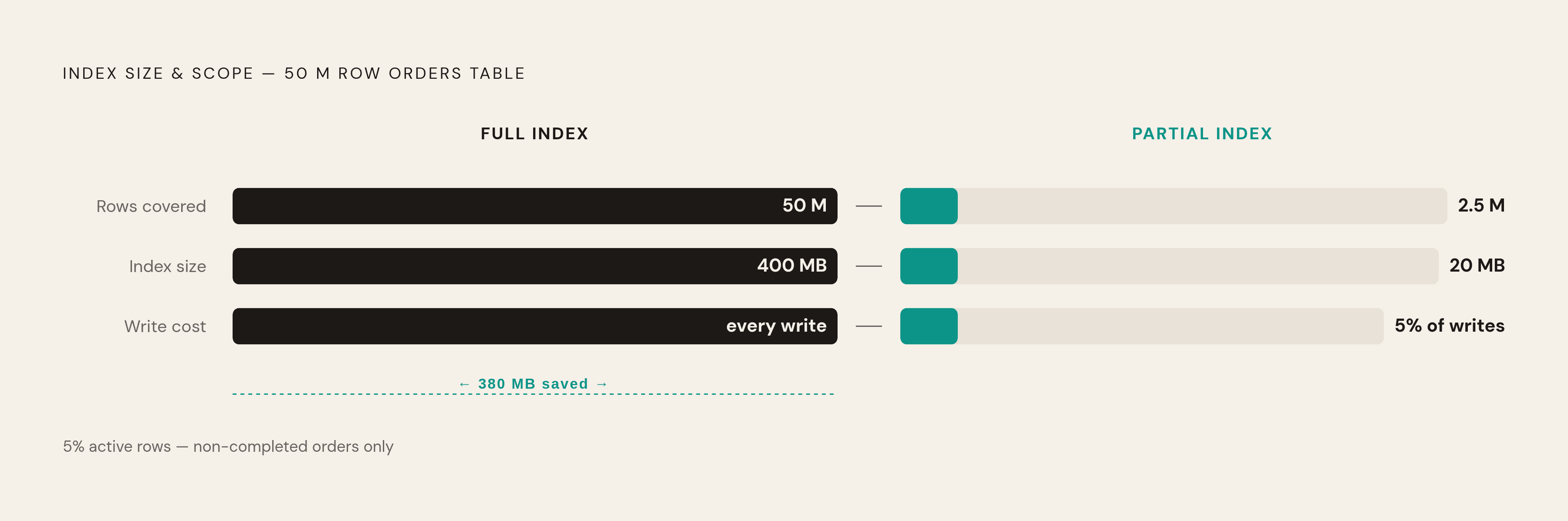
Picture a 50-million-row orders table. 95% of those rows say status = 'completed'. Nobody queries those rows. Nearly every real query goes after the 2.5 million rows that are active, pending, or failed.
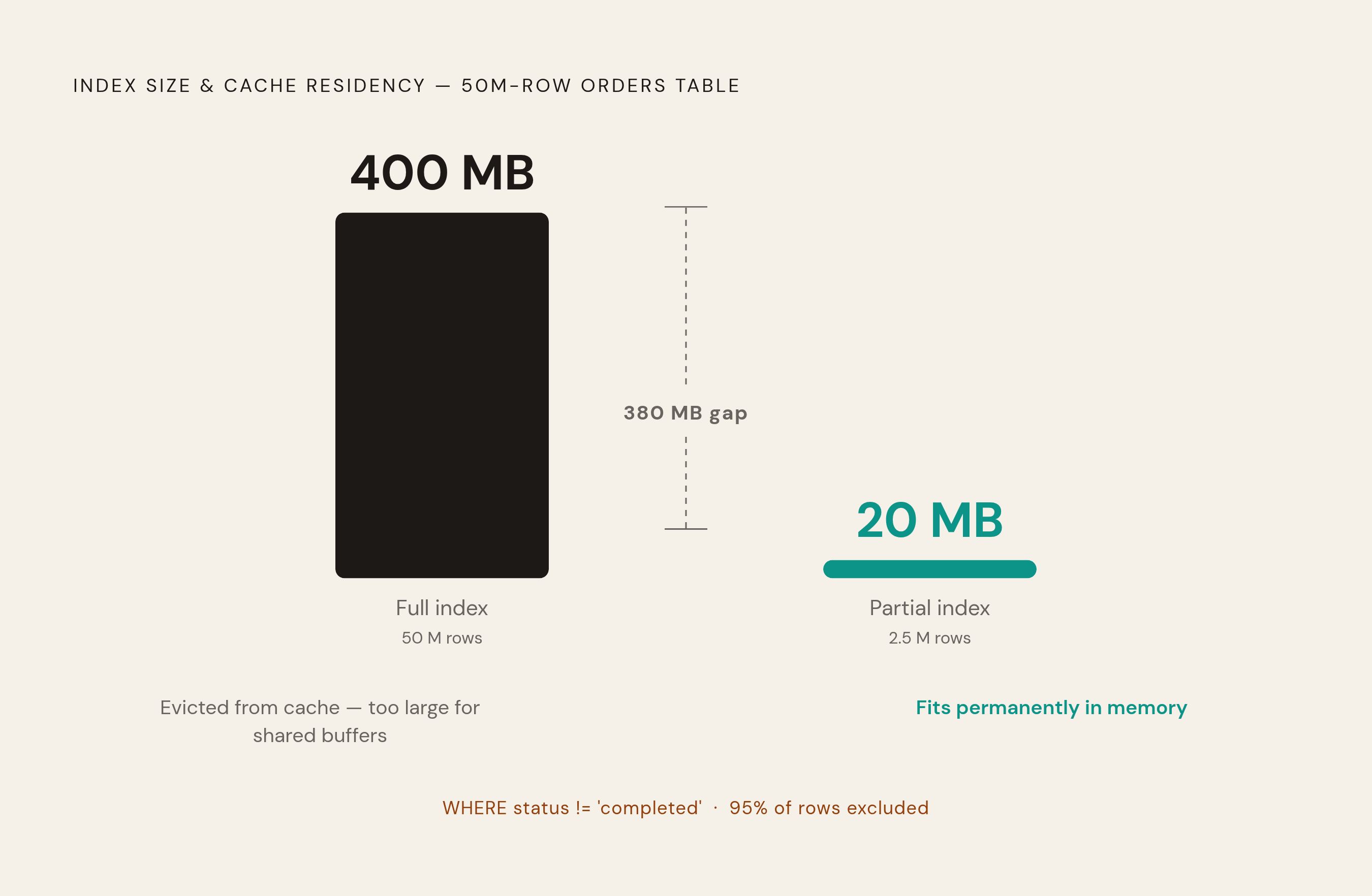
A normal index on that status column covers all 50 million rows, including the vast majority of rows that go largely unrequested. That index might land around 400 MB. A partial index covering only the non-completed rows comes in around 20 MB — a 380 MB gap that's a real operational cost, not just a disk-space line item.
Postgres keeps a chunk of data in memory, in what's called shared buffers, avoiding a disk hit on every query. That space is limited. A 400 MB index has to fight your hot data for room in there. A 20 MB index just fits and stays resident, so repeated queries hit memory instead of disk. That's where much of the speed gain comes from.
There's also a threshold worth knowing about: once a query's result set crosses roughly 30% of the table, the planner tends to give up on the index and scan the whole table sequentially. Indexing a value that shows up in 95% of rows was largely wasted effort from the start — the planner was unlikely to use it for that value anyway. Postgres's documentation says this outright: once a value covers more than a few percent of the table, there's little point keeping those rows in the index at all.
Keeping them there costs something too. Every INSERT, UPDATE, or DELETE has to update every index on the table. A giant index on a status column means paying that write cost on millions of rows the index will rarely help you find.
How the query planner decides whether to use a partial index
Postgres has one rule here, and it's strict: the planner will only use a partial index if it can prove the query's WHERE clause implies the index's WHERE clause. Not "resembles." It needs a provable implication.
A few examples make this concrete:
- Query:
WHERE status = 'pending'. Index:WHERE status = 'pending'. This is a match, so it gets used. - Query:
WHERE status = 'pending' AND created_at > '2024-01-01'. Still used, because that condition is a stricter version of the index's predicate. - Query:
WHERE status != 'completed'. Index:WHERE status = 'pending'. Not used. The planner can't prove one implies the other, even though most non-completed rows are likely pending.
The planner reads syntax, not intent. A query that's logically equivalent to the index predicate but worded differently doesn't clear the bar.
One notable capability: Postgres can combine two separate partial indexes at query time. Two narrow, purpose-built partial indexes can team up to answer a query that neither one could answer alone.
The underlying rule guiding all of this is selectivity. The size reduction of a partial index scales with how selective its WHERE clause is. Index 5% of the table, and you get something like a 95% size cut. Index 80% of the table, and you've barely moved the needle. Aim these at the minority — the smaller the slice, the more the index is worth building.
The canonical patterns where sparse filtered queries appear
A few shapes show up again and again once you start looking for them.
Status columns with heavy skew. This is the example straight from the Postgres docs: an orders table where unbilled orders are a small slice of the total but get queried constantly, while billed orders pile up and mostly sit untouched.
CREATE INDEX orders_unbilled_index ON orders (order_nr) WHERE billed IS NOT TRUE;Task and queue tables. Completed tasks accumulate over time. Open tasks stay small in comparison. Your application almost always queries the open ones. This is the classic queue-drain shape: the useful slice shrinks relative to the dead weight as the table ages, so the partial index gets more valuable over time, not less.
Soft deletes.
CREATE INDEX CONCURRENTLY idx_users_active_email ON users (email) WHERE deleted_at IS NULL;Deleted rows get excluded entirely, both from lookups and from uniqueness checks. You can even enforce "unique among active users" with a partial unique index:
CREATE UNIQUE INDEX CONCURRENTLY idx_users_unique_active_email ON users (email) WHERE deleted_at IS NULL;That works with ON CONFLICT for upserts, but there's a catch worth flagging: the ON CONFLICT clause has to match the partial index's WHERE condition exactly, or Postgres won't connect the two.
Known-common values you can skip. Postgres's docs give the example of access logs where most traffic comes from a known internal IP range. If your searches only ever target external IPs, there's little reason to index the internal ones.
JSONB and complex predicates. The WHERE clause on a partial index isn't limited to simple equality; it can reference regex matches, function calls, prefix checks. Heap.io ran into a case like this: an event table with 10 million rows, where signup events made up just 0.03% of the total. A partial index on that slice made the signup lookup dramatically faster without indexing the other 99.97%.
Correlated NULLs. An engineering case out of Cubbit is a nice example of domain knowledge encoded directly into an index. Every row in their files table with size = 0 also had a NULL file_hash, so the useful index wasn't on size alone:
CREATE INDEX ON files (size) WHERE size = 0 AND file_hash IS NULL;That compound predicate captures a fact about the data that a plain index simply can't.
What benchmark numbers actually show about the speedup
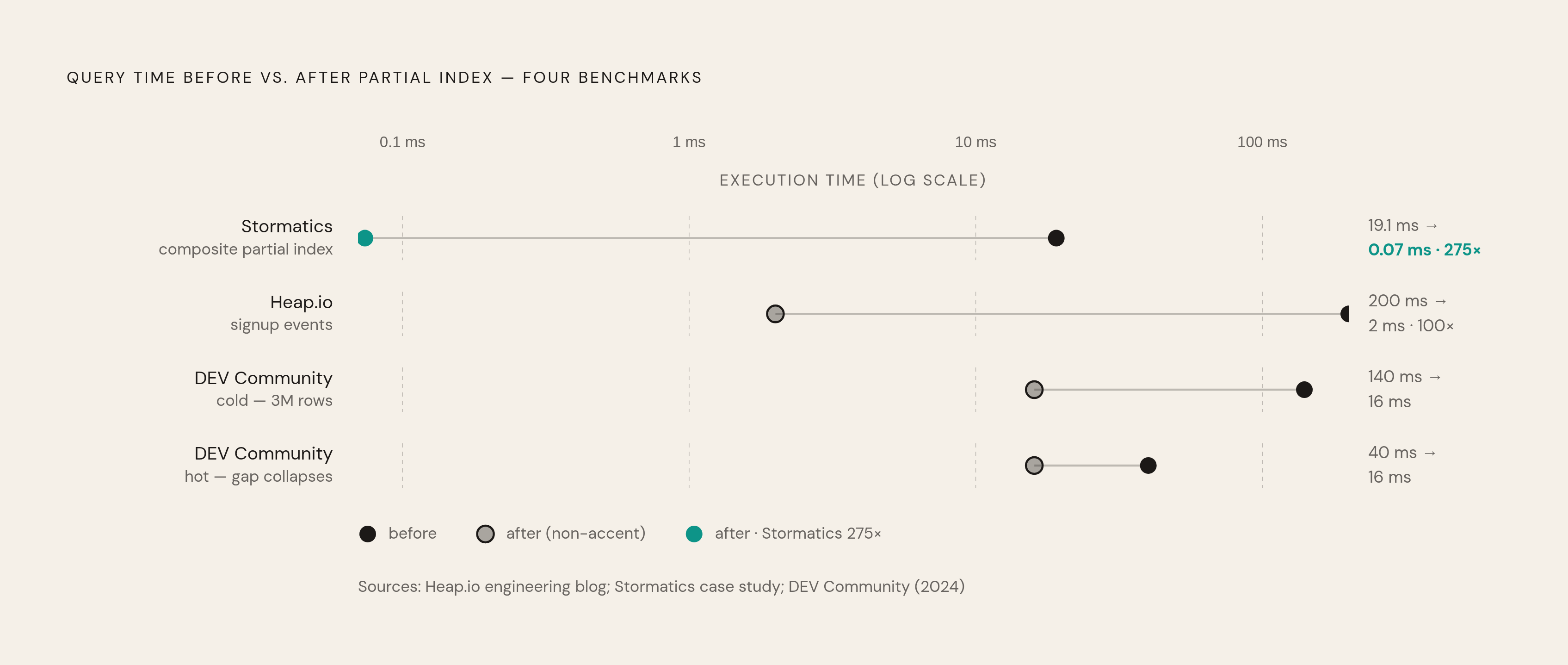
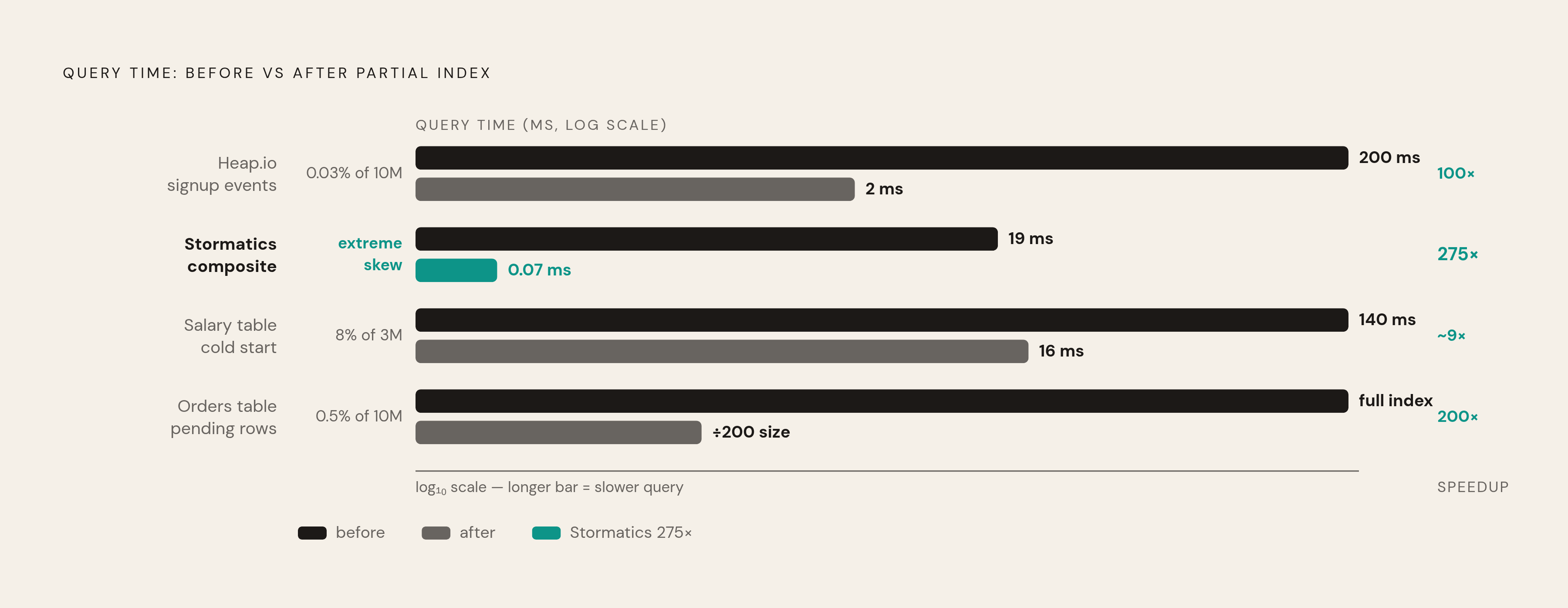
Heap.io's signup event query dropped from 200ms cold to 2ms on repeat runs, on that same 10-million-row table. Because signups were only 0.03% of all events, the write overhead for maintaining the index was close enough to zero that Heap.io described the index as essentially free.
Stormatics ran a benchmark combining a partial predicate with a composite index and saw execution time fall from 19.078 ms to 0.074 ms — close to a 275x improvement, illustrating how a partial predicate and smart column selection compound rather than just add up.
A DEV Community case looked at a salary table: 3 million rows, only 247,000 marked "current." A full index ran about 140ms cold and 40ms hot. The partial index ran 16ms both times, cold and hot. That gap collapsing is the interesting part: when the index is small enough to live in buffer cache permanently, "cold start" mostly stops being a thing.
At bigger scale: 10 million orders, 50,000 pending. The partial index came out roughly 200 times smaller than a full index covering everything — a ratio that's a fairly direct predictor of how much I/O and cache pressure you save.
Put together, a few things fall out of these numbers:
- The gains aren't linear. They scale with how extreme the skew is.
- Buffer cache residency, meaning whether the index fits in memory permanently, is often the bigger real-world win, bigger than raw index size alone.
- Extreme skew (Heap.io's 0.03%, Stormatics' 275x) gets you the eye-popping numbers, but moderate skew (the salary table's roughly 9x cold improvement) still counts as a real win. It's worth building before you hit a 0.03% case.
Write performance and maintenance overhead that partial indexes reduce
Every index on a table has a write tax. Insert a row, update a row, delete a row, and Postgres has to update every index that row touches. Stack up multiple full indexes on a busy table and that tax adds up fast.
Partial indexes flip the math. An index entry only gets written when the row actually matches the WHERE clause. A row that doesn't match just passes through, no index work done at all. Postgres's own documentation says this plainly: partial indexes speed up write operations "because the index does not need to be updated in all cases."
The Heap.io example is a clean illustration: signup events were 0.03% of the table, so nearly every write to that event table involved zero index maintenance for that particular index.
This matters most for tables that grow without bound: logs, events, audit trails. A full index on a status or type column in one of these tables accumulates maintenance cost on every insert, indefinitely. A partial index targeting just the actionable slice keeps that cost tied to the size of the matching fraction, not the size of the whole table.
One caveat worth flagging: if the WHERE clause on your partial index matches 80% of rows, the write savings barely register. High skew is the prerequisite, both for read speed and for write savings.
Covering partial indexes and when to add INCLUDE columns
Say you've built a well-targeted partial index. There's still a gap: the planner might find the right rows fast, but then has to fetch the actual data pages (the heap) to grab columns that aren't in the index. That heap fetch costs I/O on every matching row.
The fix is INCLUDE. You add the non-filter columns your query needs directly into the index, so the whole query can be answered from the index alone — an index-only scan, with no heap trip needed.
Here's an example from mydba.dev, for a dashboard pulling pending orders:
CREATE INDEX CONCURRENTLY idx_sim_bp_orders_pending_by_amount
ON sim_bp_orders (total_amount_cents DESC)
INCLUDE (order_id, user_id, created_at)
WHERE status = 'pending';
This index is sorted the way the ORDER BY needs, carries every column the SELECT wants, and only covers pending rows. A full index on (status, total_amount_cents) covering the whole table would hold roughly five times more entries, since pending orders are only about 20% of the table. Same query result, dramatically smaller index.
When does INCLUDE earn its keep?
- Great for dashboard or reporting queries that ask for the same fixed set of columns most of the time.
- Less useful when the SELECT list changes query to query, or when so few rows match that heap fetches are cheap anyway.
- INCLUDE columns add width to the index, so the size savings from the partial predicate need to be big enough to absorb that added cost.
Combine a partial predicate with INCLUDE, and a slow dashboard query can turn into a sub-millisecond index-only scan — the difference between a page that feels instant and one that makes people wait.
Finding candidates in your schema and validating the index is actually used
Start with the obvious markers: status columns, boolean flags, soft-delete columns. Anytime you add one of these to a table, ask whether a partial index makes sense at design time, not after the table has grown to millions of rows and the fix becomes a migration project.
Use pg_stat_statements to find slow or frequent queries filtering on low-cardinality columns. Those are your best candidates. Run ANALYZE first, so the planner's statistics are current before you judge whether it's making a good decision.
When you're ready to build the index on a live table, use CREATE INDEX CONCURRENTLY. It builds without holding an exclusive lock, so production traffic keeps flowing.
Then check that it's actually being used:
EXPLAIN (ANALYZE, BUFFERS) SELECT * FROM orders WHERE status = 'pending';Look for a line that says "Index Scan using idx_orders_active_status" or similar. If you see a sequential scan instead, the planner likely couldn't prove implication between your query and the index predicate — check the exact wording. A large gap between the estimated and actual row counts in the plan means you should run ANALYZE again before assuming the index is broken.
Name these indexes so the predicate is obvious at a glance: idx_orders_pending_status, idx_users_active_email. Anyone reading pg_indexes or an EXPLAIN plan later should be able to tell what the index covers without opening the DDL.
Know when to skip this entirely. If the WHERE clause would cover most of the table, a regular index does the same job with less schema complexity to maintain. If the data is spread fairly evenly across the predicate's values, look at partitioning instead — Postgres's own docs draw that line explicitly. One more edge case worth knowing: a partial index can also be used deliberately to steer the planner away from using an index on a column, which is a niche move but a real one.
Partial indexes pay off when the world is lopsided: most of your rows are one thing, and your queries mostly care about the rare other thing. Find that shape in your schema, and a partial index turns a big, expensive, half-useful index into a small, cheap, largely-useful one.