Postgres Row-Level Security Policy Design Patterns
Secure multi-tenant databases by mastering RLS's two-gate model.
Postgres row-level security gives you four building blocks: USING, WITH CHECK, session variables, and combining rules for permissive vs. restrictive policies. Snap them together the right way and RLS tends to hold up under multi-tenant load, cross-team access, and audits. Snap them together the wrong way and you get a database that looks secure in a demo and leaks in production.
Here's the part that surprises people who haven't dug into RLS before: it isn't a filter that runs after Postgres fetches your rows. It's a rewrite. When you run SELECT * FROM documents, Postgres actually turns that into SELECT * FROM documents WHERE <policy expression> before it even picks a query plan. That matters. A policy that reduces down to tenant_id = 42 gets to use an index on tenant_id much the way a hand-written WHERE clause would. RLS isn't a tax bolted onto your query. It's a predicate that competes for the same optimizations as everything else you wrote.
The other thing worth knowing up front: RLS defaults to deny, not allow. Enable RLS on a table and forget to write a policy? Nobody sees any rows. Nobody updates any rows. Silence means "no," which is the opposite of how most application code works, where a missing WHERE clause quietly hands out the entire table.
RLS showed up in Postgres 9.5, and the planner's handling of it has gotten steadily better in the releases since. That's relevant, because a lot of the "RLS is slow" folklore floating around predates the versions doing the heavy lifting today.
The four composable building blocks every RLS pattern uses
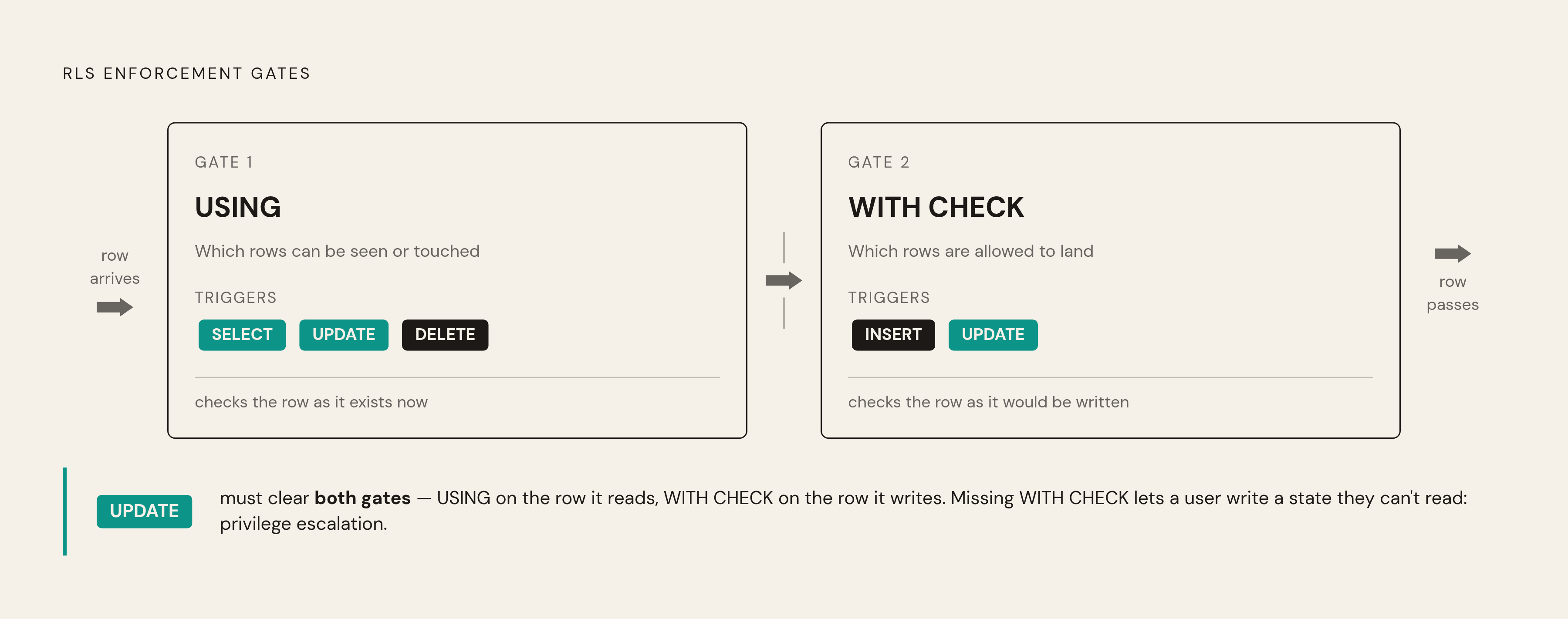
1. USING vs. WITH CHECK. These are two different gates, and conflating them is one of the most common ways people build a broken policy.
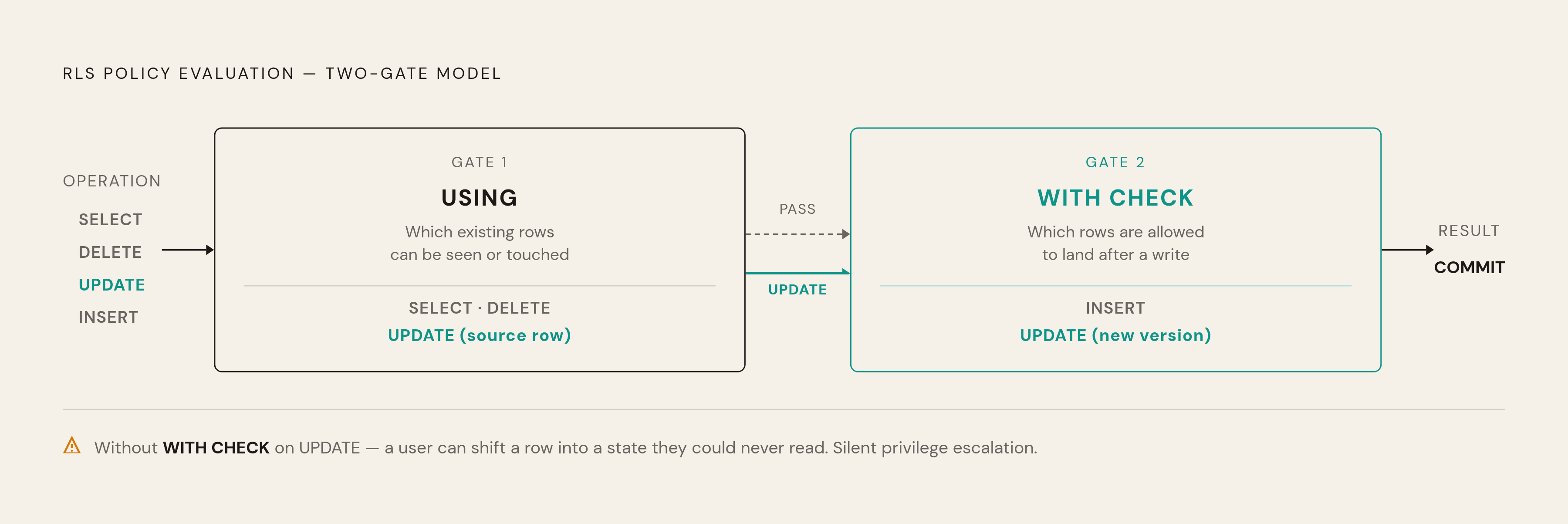
- USING governs which existing rows you're allowed to see or touch. It applies to SELECT, the source rows of an UPDATE, and DELETE.
- WITH CHECK governs which rows are allowed to land after a write. It applies to INSERT and to the result of an UPDATE.
A SELECT-only policy only needs USING. An INSERT-only policy only needs WITH CHECK. But UPDATE needs both, because you're doing two things at once: picking a row to change, and producing a new version of it. Skip WITH CHECK on an UPDATE policy and you've built something strange: a user can update a row into a state they'd rarely be allowed to read in the first place. That's not a hypothetical edge case. That's an accidental privilege escalation sitting quietly in your schema until someone finds it.
2. Session variables. RLS needs to know who's asking. Postgres doesn't have a built-in concept of "current tenant" or "current user" for your app, so you pass it in yourself, usually through a GUC (a configuration variable):
SET app.current_tenant = 'id'sticks around for the life of the connection.set_config('app.tenant_id', '2', true)is scoped to the transaction and reverts when it ends.
Which one you want depends on your connection pooling setup, which we'll get to. Get this wrong and you either leak context between requests or lose it mid-transaction, neither of which is a fun bug to chase.
3. Role targeting. Policies don't have to apply to everyone. You can write one policy for a read-only reporting role, a different one for the application's write role, and another for an ops role that needs broader access. Postgres's role membership and inheritance system decides which policies stack for a given user, which is exactly what makes the next building block useful.
4. Permissive vs. restrictive combining. By default, policies are permissive, and permissive policies OR together. Add a new permissive policy and you've widened access. That's fine for stacking access grants, but it's risky for anything that's supposed to be a hard rule, because another policy can come along and grant an exception around it.
That's what restrictive policies are for. Mark a policy AS RESTRICTIVE and it gets AND'd against the permissive result instead of OR'd. A restrictive policy can only narrow access. It can't expand it. So a compliance rule like "nobody outside admin sees archived rows" belongs in a restrictive policy. Written as permissive, it's a suggestion. Written as restrictive, it's a floor nothing else can dig under.
There's a fifth primitive that doesn't get talked about enough, and it's one that trips up almost every RLS tutorial: FORCE ROW LEVEL SECURITY. Enabling RLS on a table activates policies for everyone except the table owner. The owner (usually whatever role ran your migrations) bypasses RLS by default, policies or not. FORCE ROW LEVEL SECURITY removes that exemption. Skip it, and the account that built your schema can read every row in it, no matter how carefully you wrote your policies. This is often the first thing an auditor is going to ask about, and it's worth having a real answer ready.
Tenant isolation in a shared-schema SaaS database
The most common reason people reach for RLS in the first place: they're running one database, one schema, many tenants, and they're tired of trusting every single query to remember WHERE tenant_id = ?. One missed clause in one endpoint, and tenant A is looking at tenant B's data. This isn't rare. One researcher scanning production apps found this exact leak pattern in more than 10% of the apps checked (CVE-2025-48757). That's not a fringe mistake. That's a structural weakness in how most apps handle multi-tenancy by hand.
The standard fix looks like this:
- Middleware runs
SET app.current_tenant = '<id>'right after opening the connection. - Every table carries a policy like
USING (tenant_id = current_setting('app.current_tenant')::uuid). - From there, every query in that session is automatically scoped. No per-query WHERE clause required.
Here's where it gets interesting, though. What happens if a user has direct access to the database, not just through your app? They can just run SET app.current_tenant = '999' themselves. If your policy trusts that raw value without question, you've built a system where anyone with a database connection can impersonate any tenant they like. The session variable is a claim, not a credential. Treat it that way. The safer pattern validates the tenant ID against an authenticated mapping table, or wraps the whole thing in a SECURITY DEFINER function that checks the requesting user's actual membership before it ever sets the session context. Avoid letting the raw current_setting() value be the only thing standing between a user and someone else's data.
The same logic applies to writes, and this is where WITH CHECK earns its keep again. Skip it on your INSERT or UPDATE policy, and a tenant can write a row tagged with someone else's tenant ID, assuming your app ever passes the wrong value (bugs happen). Mirror your USING expression in WITH CHECK: WITH CHECK (tenant_id = current_setting('app.current_tenant')::uuid). Now the same rule governs what you can see and what you can create.
One more practical note on performance: put tenant_id directly on every table, even if you could theoretically derive it by joining through some other table. Resolving tenant membership through a join means every single policy check runs an extra subquery. That's not a design smell, it's the recommended default for RLS-heavy schemas (per scottpierce.dev's RLS optimization analysis). And whatever you do, index that column. The planner is going to reference it on nearly every query that touches the policy.
Role hierarchies and restrictive policies for cross-team data access
Multi-tenancy is the easier case, because the rule is usually just "your rows, not theirs." Cross-team access inside one company is messier. Picture a deals table where sales reps see only their own deals, managers see their team's deals, and finance sees everything. Same table, three different slices of visibility, no tenant boundary to lean on.
The building blocks handle this fine once you see the pattern. Write one permissive policy per role tier, each scoped with TO role_name. Because permissive policies OR together, a user who belongs to multiple roles automatically gets the union of whatever those roles grant. Set up role inheritance so a manager role includes the rep role, then layer a broader permissive policy on top for the manager tier specifically. Access grows as you climb the hierarchy, which is exactly what you want.
But what about rules that aren't supposed to bend based on role? Say there's a compliance requirement: nobody outside admin sees rows marked archived = true, full stop, no exceptions. This is exactly the restrictive policy use case from earlier, and it's worth restating here because it's such a common mistake. Write that rule as permissive, and it's not really a rule anymore. Some other permissive policy, maybe added six months later by someone who's never heard of the archive requirement, can OR right past it. Write it as restrictive, and it's AND'd against everything else. A row has to clear the mandatory control and some permissive grant to be visible. That's the difference between a rule and a suggestion.
The USING/WITH CHECK split matters here too, just applied differently:
- A support role that can read another team's records but never modify them gets a policy with USING only. No WITH CHECK means no path to writing at all.
- A role that can update records only within its own scope needs both USING and WITH CHECK to express that scope. Otherwise you get a similar problem from earlier: a user updates a row into a state outside their own access tier, because nothing was checking the result of the write, only the starting point.
One more thing worth saying plainly: policies pile up. Every new team, every new exception, adds another policy to the pile, and combining logic that's simple with three policies gets considerably harder to reason about with fifteen. There's no clever technical fix for this, just discipline: name policies consistently, keep a running note of which ones are permissive and which are restrictive, and review the whole set whenever a role gets added. This is the kind of thing that's cheap to maintain as you go and expensive to reconstruct later.
Performance characteristics: where RLS is fast and where it can go wrong
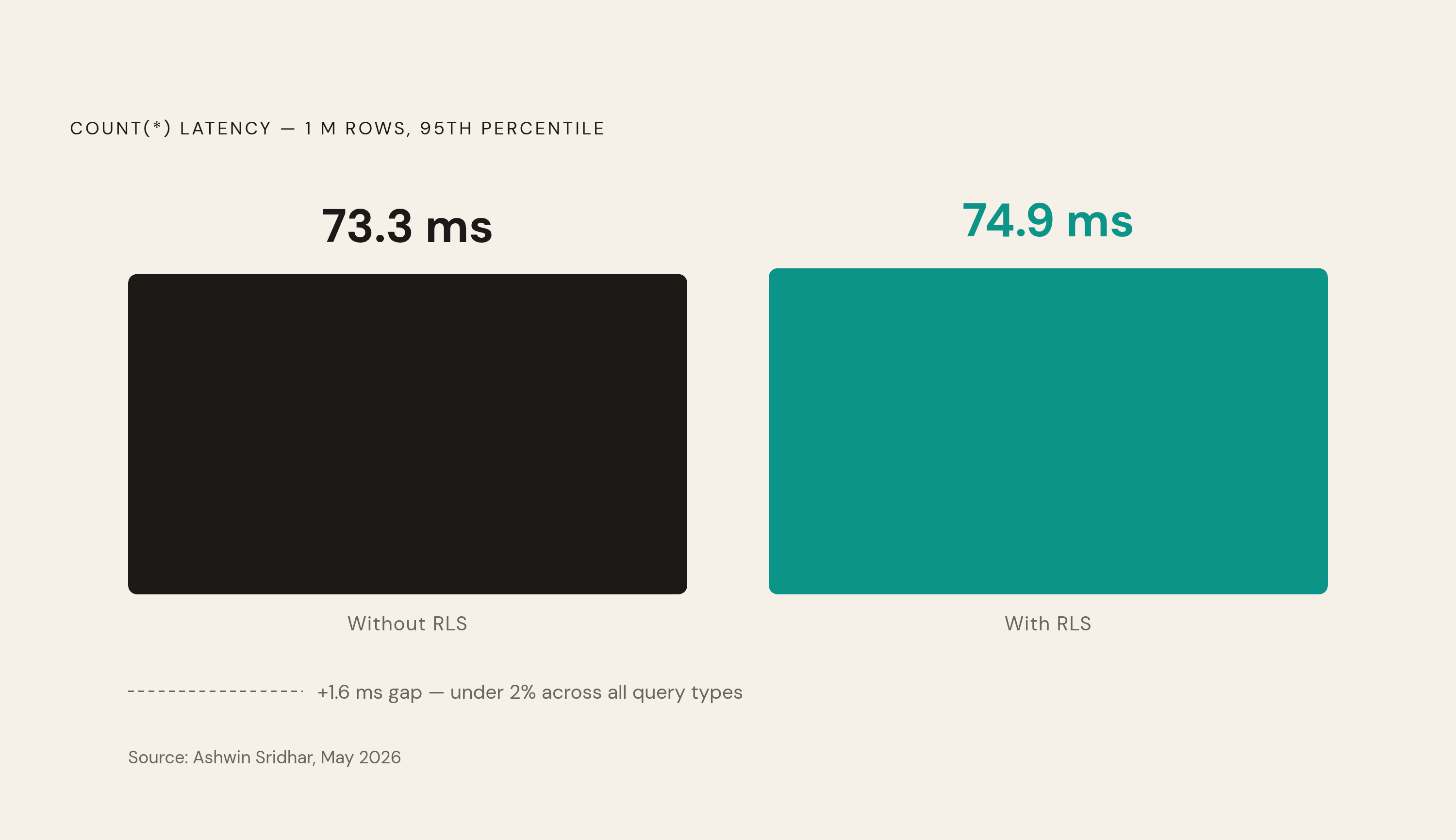
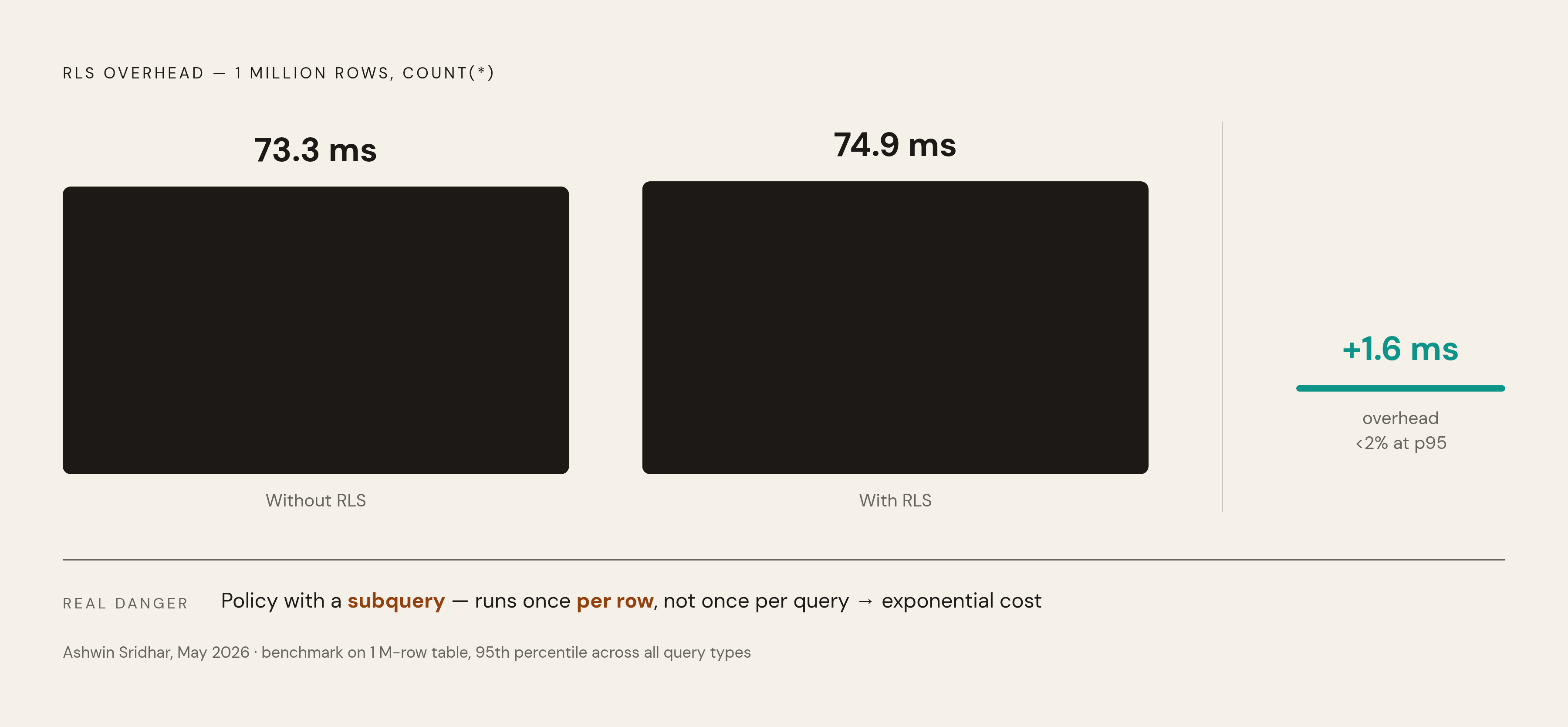
Start with the good news, because the "RLS is slow" reputation deserves some pushback. A benchmark on a 1-million-row table (Ashwin Sridhar, May 2026) found a full-table COUNT(*) took 73.3 milliseconds without RLS and 74.9 milliseconds with RLS turned on. That's a 1.6 millisecond difference. Across every query type in that test, the gap at the 95th percentile stayed under 2%. A well-built policy against an indexed column tends to cost microseconds, not the kind of overhead that compounds as your app scales.
Why does it stay this cheap? Because of that rewrite-before-planning behavior from the beginning. The policy predicate gets folded into the query before Postgres picks a plan, so it can ride the same index your hand-written WHERE clause would use. The cost gets paid once per query, not once per row.
Now the bad news, because there is a real way to blow this up. If your policy expression contains a subquery, say, checking membership in some association table, that subquery can end up running once per row returned, not once per query. Your query time can stop scaling linearly with result size and start scaling exponentially (per scottpierce.dev's RLS optimization analysis). Worse, RLS policies respect other RLS policies. So a subquery buried inside a policy might trigger a whole separate policy evaluation on some other table, and that cost compounds too. The fix mirrors the tenant-isolation advice from earlier: denormalize, put tenant_id (or whatever you're checking) directly on the table instead of joining out to find it. If a lookup truly can't be avoided, wrap it in a SECURITY DEFINER function with some caching, or materialize the membership check as an actual column instead of a live join.
There's a subtler wrinkle around something called LEAKPROOF. Postgres has to evaluate security-relevant predicates before it evaluates user-supplied ones that could leak row contents through error messages or side effects (think a function that throws an error only for certain values, quietly confirming which rows exist). Only functions and operators explicitly marked LEAKPROOF are allowed to be reordered ahead of a security qual by the planner. Most basic integer and UUID comparisons qualify. Pattern matching with LIKE doesn't. Very few user-defined functions do, by default. So if your policy expression relies on something non-leakproof, the planner typically cannot reorder it ahead of a more selective predicate elsewhere in your query, even when doing so would be faster. It's not a bug. It's Postgres being conservative about what it's willing to let leak. Plan your policies with that constraint in mind rather than fighting the planner over it.
For genuinely large multi-tenant systems, partitioning by tenant is the real scaling lever. Combine declarative partitioning with RLS and Postgres can prune entire partitions before policy evaluation even happens, which cuts I/O dramatically for single-tenant queries. It's worth considering once a single tenant's data grows large enough that even an indexed scan against the full table starts to drag.
Security bypasses that quietly undo policy enforcement
This is the section worth reading twice, because every failure here looks similar from the outside: you write correct policies, and the database shows you everything anyway. The bug usually isn't the policy. It's who's running it.
Superusers bypass RLS entirely. By default, a superuser role carries BYPASSRLS, which means policies simply don't apply to it. If you're testing your setup by logging in as a superuser and confirming you can see all the rows, congratulations, you've confirmed nothing about your actual policies. Test as the application role, and do so consistently. Also take a look at which roles in your system actually carry BYPASSRLS. That list is worth auditing. Replication slots, emergency DBA access, that's about it.
Table owners bypass RLS too, separately from BYPASSRLS, and this doesn't require any special attribute. It's built in. Whatever role owns the table, usually your migration role, can read straight through every policy on it, because Postgres doesn't apply RLS to owners by default. This is what FORCE ROW LEVEL SECURITY is for, and it's the fix mentioned earlier worth repeating here: apply it to every RLS-enabled table. Skip it, and your migration role is a standing bypass that nobody remembers exists until someone goes looking.
Views run as their owner, not as whoever's querying them. This one catches people off guard. If a view was created by the postgres role, Postgres evaluates RLS policies as that role when the view runs, not as the person actually querying it. So a caller who should be locked out by policy can end up seeing rows anyway, simply because the view itself was built by a role that RLS doesn't restrict. It's worth checking who owns your views, not just your tables, if you're relying on views as part of your access story.
None of these are exotic attacks. They're default behaviors, quietly doing exactly what Postgres documents them to do. The problem is that "quietly doing what's documented" and "what you assumed would happen" are two very different things, and the gap between them is where most RLS setups actually fail. The fix isn't more clever policies. It's checking, deliberately, who's exempt before you trust what the policies show you.