Zero-Downtime Schema Migrations in Postgres with pg_repack
Avoid costly downtime by understanding which Postgres migrations lock tables and how to prevent it.
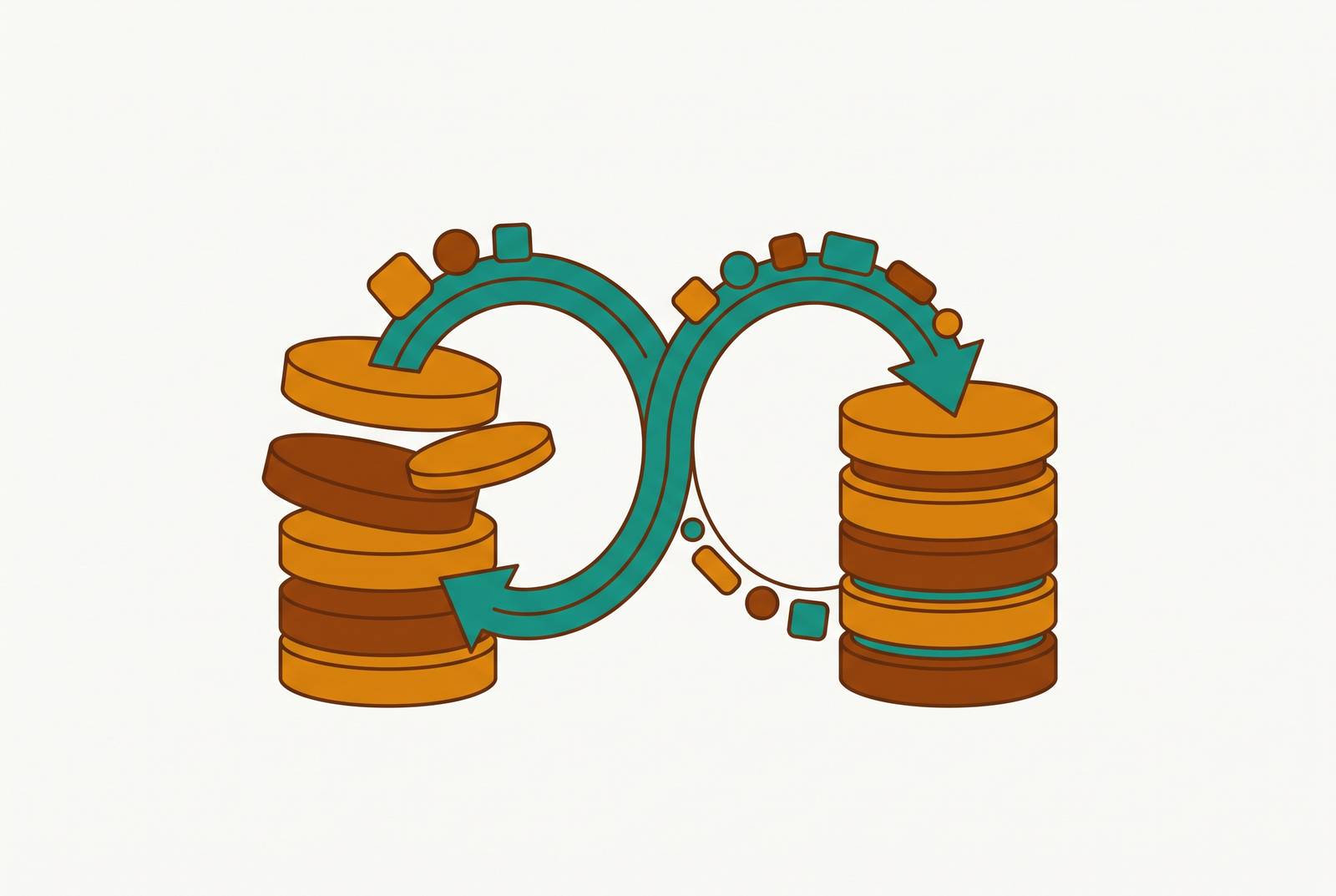
A schema migration and a table cleanup sound like the same job. They aren't the same thing, though. One fixes bloat that piles up from normal use. The other changes the actual shape of a table. Postgres handles them differently, and confusing the two is how a routine ALTER TABLE turns into a 45-minute outage.
Here's a real version of that outage: a 3-second ALTER TABLE gets queued behind a slow analytics query that happens to be running on the same table. The DDL waits. Every query that shows up after it waits too, stacking up behind the DDL like cars behind a stalled truck. Before anyone notices, 2,000 connections are blocked and the app is effectively down. The ALTER TABLE itself wasn't the problem. The lock it needed was.
That's the mechanic at the center of this piece: AccessExclusiveLock. It's how Postgres protects the integrity of a table's structure while changing it, and no config flag turns it off. But it means planned schema changes carry the same financial exposure as unplanned outages. Documented downtime costs run from $300,000 to over $1 million per hour depending on the business. A migration that "should only take a few seconds" is a very different thing from a migration that carries little risk.
This piece covers two separate problems that both get lumped under "Postgres maintenance":
- Bloat (dead rows piling up over time, making tables and indexes bigger and slower than they should be).
- DDL rewrites (schema changes that require Postgres to lock and often rewrite the whole table).
pg_repack solves the first problem directly and elegantly. For the second, it helps in some cases and does nothing in others. Knowing which is which, before running anything, is the entire game.
How Postgres stores rows and why tables accumulate dead weight over time
Postgres doesn't update rows the way you might picture it. An UPDATE doesn't touch the existing row and change its values. It marks the old row dead and writes a brand new one elsewhere in the table. A DELETE doesn't erase anything either; it just marks the row dead and leaves it in place.
This is MVCC (multi-version concurrency control), and it's how Postgres lets multiple transactions read and write without stepping on each other. The tradeoff: dead rows pile up. Something has to come along and clean them out. That something is autovacuum.
Under normal traffic, autovacuum mostly keeps up. But under bulk workloads, it falls behind fast:
- Large bulk imports
- Mass deletions
- Big batch updates (the kind that touch millions of rows in one pass)
Dead tuples accumulate faster than autovacuum can reclaim them, and the table starts carrying dead weight.
How much is too much? Practitioners generally use these rough markers:
- Up to 20% bloat (normal, roughly comparable to fill factor overhead). Nothing to worry about.
- 50% or higher. Performance problems start showing up. Sequential scans slow down, indexes bloat too, and the table takes up disk it doesn't need.
Here's the part that surprises people: even after autovacuum runs, the table's logical size usually doesn't shrink. Autovacuum marks dead space as reusable by future inserts, but it can't hand that space back to the operating system. It can't compact the file. The table just sits there, bigger than it needs to be, unless something more aggressive steps in.
That "something more aggressive" is traditionally VACUUM FULL or CLUSTER. Both physically rewrite the table and its indexes from scratch, and both do it under an AccessExclusiveLock held for the entire operation. On a large table, that's not a quick maintenance window. That's scheduled downtime with extra steps.
This is the exact gap pg_repack was built to close: get a similar physical result to VACUUM FULL, compact and clean, without locking the table for the whole job.
Which DDL operations are actually dangerous in modern Postgres, and which ones aren't
Not every schema change deserves the same fear. Postgres has quietly gotten a lot better about this, and knowing which operations got fixed (and which didn't) saves a lot of unnecessary anxiety, or worse, unnecessary confidence.
Safe as of Postgres 11+:
- Adding a column with a default value. Old versions of Postgres had to rewrite every row to backfill the default. Since Postgres 11, the default is stored in the system catalog and applied when the row is read. No rewrite, no long lock.
- Postgres 18 goes a step further with
ALTER TABLE ... ADD COLUMN ... NOT NULL NOT VALID, making the "add a required column" pattern even simpler natively.
Still risky, regardless of version:
- Changing a column's type. This forces a full table rewrite under
AccessExclusiveLock. On a large table, that can run 10 to 30 minutes, during which the table is largely unreachable for reads or writes. - A regular
CREATE INDEX. This grabs aSHARElock that blocks writes for as long as the build takes. On a table with a million rows, maybe seconds. On a table with 100 million rows, potentially much longer. ALTER COLUMN SET NOT NULL. Postgres has to scan the whole table to confirm no nulls exist, and it does that scan underAccessExclusiveLock.
There's also a set of traps that show up specifically because of the tools teams use to generate migrations, not because of Postgres itself:
- Rails'
add_indexgenerates a blockingCREATE INDEXunless you explicitly passalgorithm: :concurrently. - Prisma wraps migrations in a transaction by default, and
CREATE INDEX CONCURRENTLYcannot run inside a transaction at all. So the safer version isn't available unless you work around it. - Django's
AddFieldwith a default is safe on Postgres 11+, but on older versions it quietly falls back to a full table rewrite. Nothing in the framework warns you.
One might argue, "fine, the lock is brief, why does any of this matter?" It matters because of what happens around the lock, not just during it. Rewriting a large table or building an index generates a lot of write-ahead log (WAL) traffic. Replicas downstream have to process all of that, and they can fall behind significantly, sometimes staying behind well after the primary has already finished the operation. The migration "completing" on the primary doesn't mean the system has actually caught up.
CONCURRENTLY flags solve the index-creation half of this problem cleanly. But they don't touch bloat, and they don't help shrink a table that's already bigger than it should be. That's a different mechanism, and it's where pg_repack comes in.
How pg_repack rebuilds a table without blocking the application
pg_repack is a Postgres extension, originally forked from an earlier project called pg_reorg after that project stalled in late 2011. Its performance is comparable to CLUSTER, rewriting the table and reorganizing it physically, but without inheriting CLUSTER's locking behavior.
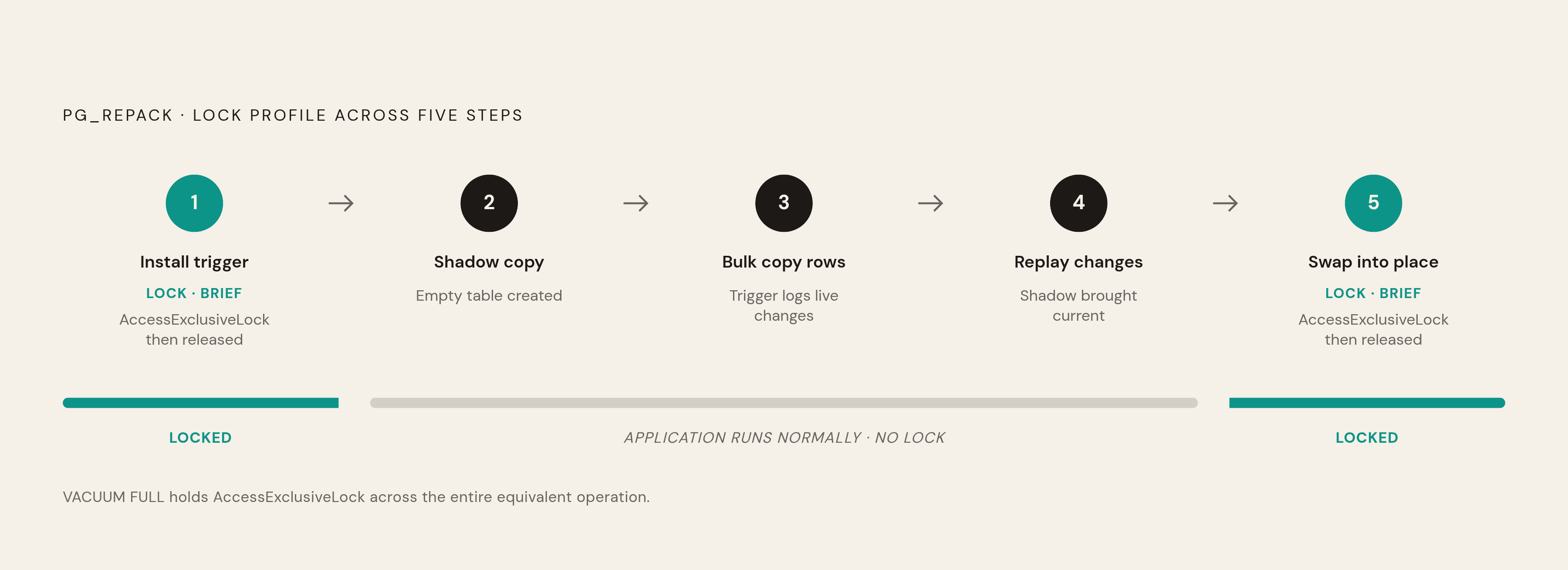
Here's the process, broken into five steps:
- Brief lock to start. pg_repack takes a brief AccessExclusiveLock at the start of the process, then releases it.
- Create a shadow copy. A new, empty version of the table gets created in the background.
- Copy existing rows. While rows are being copied into the shadow table, the trigger installed in step 1 is quietly logging every insert, update, and delete that happens on the original table in the meantime.
- Replay the changes. Once the bulk copy finishes, pg_repack applies everything that was logged, bringing the shadow table up to current state.
- Swap, atomically. A second brief
AccessExclusiveLockis taken to rename the shadow table into place and drop the old one. Then it's released.
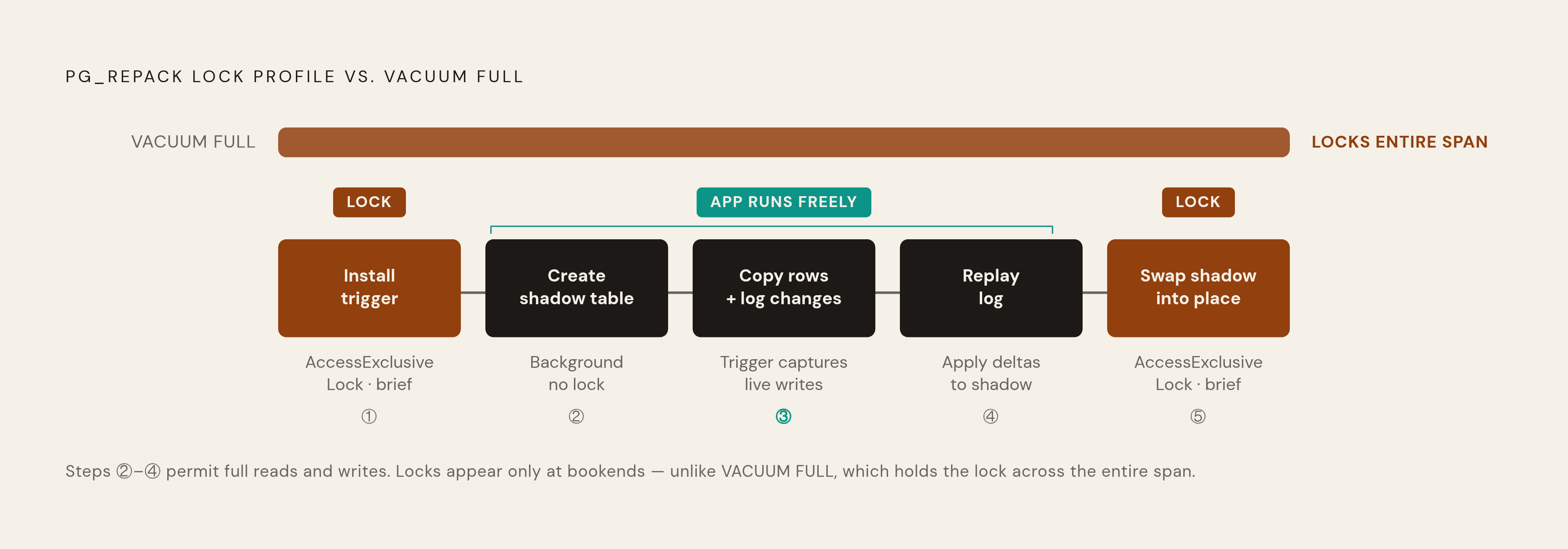
Notice what's happening for most of that process: the application keeps hitting the live table the entire time the copy and replay are running, with nothing blocking reads or writes on the original. The only two moments anything blocks are the trigger installation at the start and the swap at the end, and both are brief by design.
Compare that to VACUUM FULL, which holds AccessExclusiveLock for the entire rewrite, start to finish. pg_repack holds the same kind of lock, but only at the bookends. That's the whole trick.
Some grounding details worth knowing:
- pg_repack has been usable since Postgres 9.5, which introduced catalog and index-build features it depends on.
- The latest stable line is 1.5.2. Version 1.5.2-2 entered Debian unstable on October 9, 2025, and 1.5.2-1 moved into Debian testing on December 24, 2024.
Installing and running pg_repack against a production table
Getting pg_repack running doesn't require a cluster restart. It's available from standard package repositories, or installable from source if you need a specific build. Once installed at the system level, enable it inside the target database:
CREATE EXTENSION pg_repack;The basic command targets a single table:
pg_repack -h host -d database -t tablenameA few flags matter more than the rest:
--no-kill-backend. By default, pg_repack can terminate conflicting sessions to get its lock. This flag flips that behavior: instead of killing competing sessions, pg_repack cancels itself. On any table that matters in production, use this.--jobs. Controls parallelism during the operation. Useful for large tables with multiple indexes.-n(dry run). Runs pg_repack in a non-destructive mode before committing to the operation.
Speaking of disk: pg_repack needs free space roughly equal to twice the size of the table and its indexes combined. Repacking a 1GB table needs about 2GB of headroom on top of what's already used. This is a hard requirement, not optional overhead, and running out of space mid-operation is one of the more common ways a repack fails.
The only moment users should notice anything is the final swap, and even that should be brief.
Once the repack finishes, the table has been physically rebuilt and normal operations can resume.
What pg_repack cannot do, and where it will fail
pg_repack is not magic, and it's worth being precise about where its edges are, because hitting one mid-operation is a bad time to find out.
Hard prerequisite: the table needs a PRIMARY KEY, or a UNIQUE index on a NOT NULL column. Without one, pg_repack cannot run. No workaround.
Things it flatly cannot do:
- Reorganize temporary tables (they don't persist in the system catalogs pg_repack relies on)
- Cluster a table using a GiST index
- Add columns, change column types, or perform any general schema change
That last point is worth sitting with. pg_repack is a repacking tool. It is not a schema migration engine. It rebuilds a table's physical layout; it does not change its structure.
While a repack is running:
- No DDL is allowed against that table. No
ALTER TABLE, noDROP INDEX, noADD CONSTRAINT. VACUUMandANALYZEare the only operations explicitly permitted alongside it.
Concurrency risk: running two pg_repack sessions against the same table at once can deadlock. The extension is built to enforce one session per table, but that's worth knowing before wiring pg_repack into any automated maintenance pipeline. Automation that doesn't check for an existing run can trip over its own feet.
Disk failure mode: if the server doesn't have that roughly 2x headroom free, the operation fails partway through. Check available disk before scheduling a repack on anything large. This is one of the most preventable failures in the whole process.
So here's the plain scope: pg_repack removes bloat and reorganizes a table's physical layout, safely, without blocking traffic. For actual schema changes, type conversions, new constraints, structural DDL, it does nothing. That's the design, not a shortcoming.
Tools that handle what pg_repack doesn't: DDL-heavy schema changes
The gap that's left: column type changes, adding NOT NULL constraints, and other structural changes on large tables that would otherwise mean a long, blocking rewrite. A few tools and patterns fill this in.
Solves a similar problem to pg_repack (bloat and physical reorganization) but uses logical replication to track concurrent changes instead of a trigger and log table. That means lower overhead on the primary database and no long-held locks on system catalogs during the process. As of April 2024, pg_repack is still the more widely known and more broadly deployed of the two. pg_squeeze is newer, and the underlying mechanism is worth knowing about.
pg_osc (pg-online-schema-change)
Takes inspiration from MySQL's pt-online-schema-change and applies the shadow-table idea to general DDL, not just bloat cleanup. This is purpose-built for ALTER TABLE operations on very large tables where a direct ALTER would otherwise lock writes for an unacceptable amount of time.
Built by Xata, this is an open-source tool with a different approach aimed at reversibility and multi-version schema compatibility, something neither pg_repack nor pg_osc are designed to handle.
Native Postgres patterns, no extension required
CREATE INDEX CONCURRENTLY(avoids the fullShareLocka regular index build takes, using a weakerlockinstead, so reads and writes continue).- Expand-contract for type changes: add a new column, backfill it in batches, point application reads at the new column, then drop the old one once nothing depends on it.
NOT VALID+VALIDATE CONSTRAINT. Add a constraint without an immediate full table scan, then validate it separately later under a weaker lock.
One more practical point: a database GUI that surfaces table size, bloat estimates, and active locks in one place makes it a lot easier to catch a bloat problem before it turns into an urgent one. Basedash, a natural-language analytics platform that lets business and engineering teams query a connected database in plain English against governed metric definitions, is one tool teams use to keep that kind of operational data visible without standing up a separate monitoring stack. Instead of guessing when a table needs attention, the data is just sitting there, visible.
A decision framework for choosing the right approach before running any migration
Before touching anything, ask one question first: is this bloat, or is this a schema change?
- Bloat / physical reorganization: pg_repack is the right tool.
- Schema change (type conversion, new constraint, new
NOT NULLcolumn): nativeCONCURRENTLYpatterns, expand-contract, or a tool like pg_osc or pgroll depending on how complex the change is.
Once that's settled, confirm a few things before running anything:
- Table size in production, not staging. Behavior on 10,000 rows and behavior on 80 million rows are rarely the same operation, even if the SQL is identical. That gap has caused real production failures.
- Available disk headroom. pg_repack on a large table needs roughly 2x the table's size (plus indexes) free.
- Whether the table has a primary key or a suitable unique index. pg_repack requires one, no exceptions.
- What's currently running. A waiting DDL statement stacks every subsequent query behind it, no matter which tool is issuing that DDL.
Test against production-scale data whenever possible. A migration that looks instant on a small staging table can behave quite differently once real volume hits it, and there's no reliable way to predict that gap without actually testing at scale.
On critical tables, run pg_repack with --no-kill-backend. Letting pg_repack cancel itself is a far better outcome than letting it terminate someone else's session without warning.
Keep watching once the operation finishes, too. Replication lag is a real risk after a large rebuild completes, not just during it. Monitor replica delay in the hours following a migration, not only while it's running.
Ultimately, migration safety isn't only a database problem, it's a traffic coordination problem. Communicate with whoever's on call. Watch connection pool metrics while the operation runs. Have a rollback plan written down before starting, not improvised halfway through. The tools covered here (pg_repack, pg_squeeze, pg_osc, pgroll, and Postgres's own CONCURRENTLY patterns) all reduce risk. Planning the operation like it matters is still on you. Because it does.